
NFT Minting Made Easy for Artists

NFT Minting Made Easy for Artists
Notion Portfolio Template (Free) + Google Sheets Price Tracker
This free Notion portfolio template helps you track stocks, ETFs, and crypto using Google Sheets live price data and seamless syncing with Sheetly.
Notion Portfolio Tracker
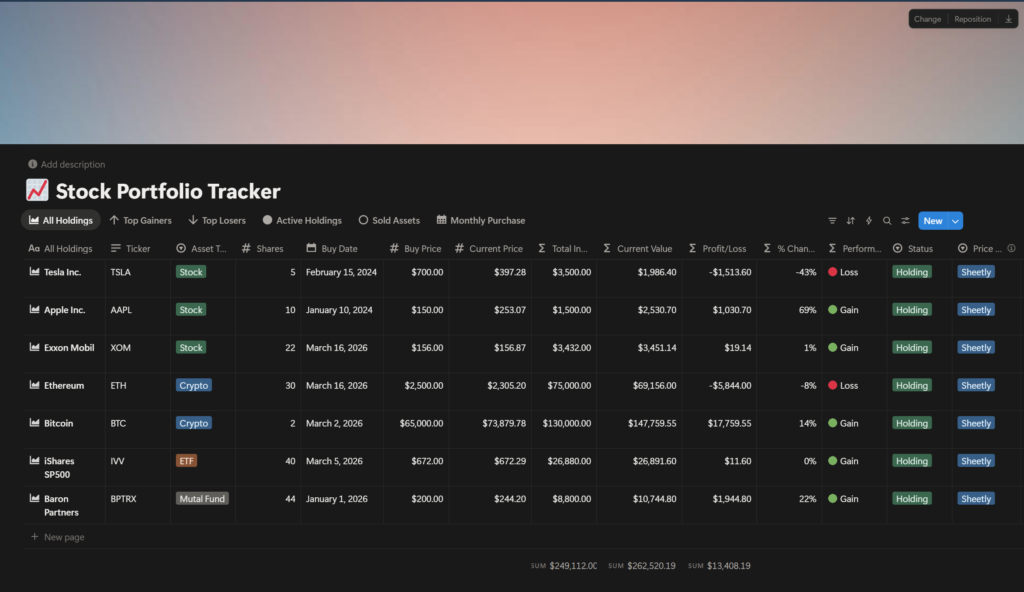
Track your stocks, ETFs, and crypto in a clean Notion database with built-in performance tracking and simple portfolio views.
Google Price Fetcher
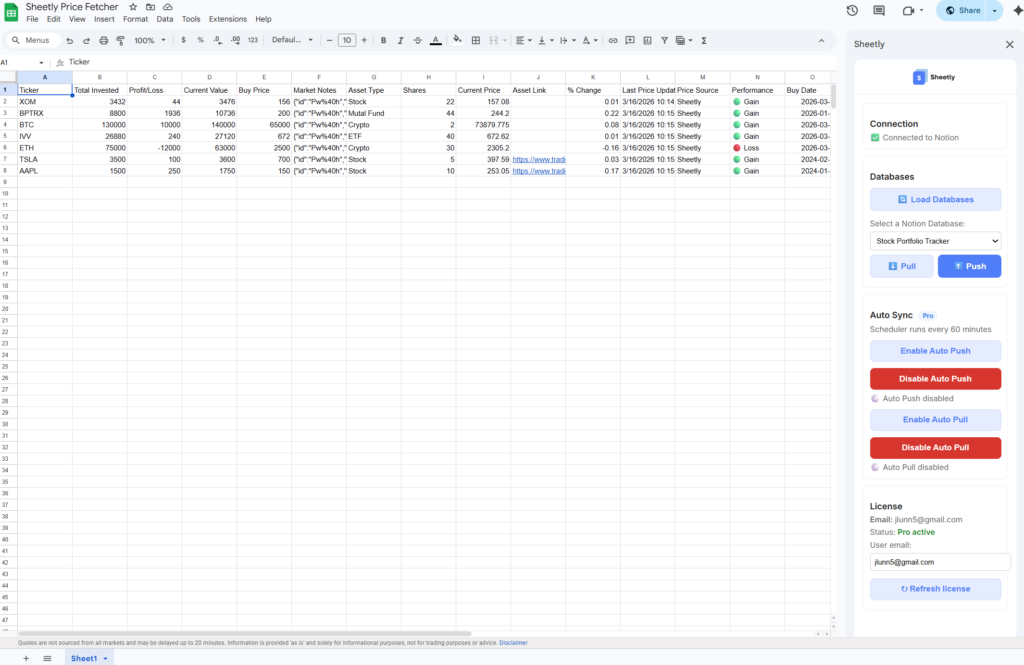
Automatically fetch live prices for stocks and crypto using simple formulas — no APIs or setup required.
How It Works
To sync your portfolio automatically, install Sheetly and connect your Notion database in seconds.
- Add your assets in Notion
Enter your stocks, ETFs, or crypto tickers in the Notion portfolio database. - Copy the Google Sheet
Open the Google Sheets template and make your own copy. - Pull your data with Sheetly
Install Sheetly and click “Pull” to sync your Notion database into the sheet. - Enable live pricing
Copy the price formula into the “Current Price” column to fetch live market data. - Push updates back to Notion
Click “Push” in Sheetly to send updated prices and portfolio values back to your Notion database.
Use Sheetly’s auto-sync (Pro) to keep your portfolio updated automatically.
Why Use This Notion Portfolio Template?
This Notion portfolio template is designed to make tracking your investments simple. Instead of manually updating prices, you can use the included Google Sheets price fetcher to pull live data for stocks and crypto.
By combining this Notion portfolio template with Google Sheets, you get real-time tracking, better organization, and a workflow that actually scales.
Track Your Portfolio with Notion and Google Sheets
Managing investments across multiple platforms can get messy. This free Notion portfolio template gives you a single place to track your holdings, including stocks, ETFs, and cryptocurrencies.
The included Google Sheets price fetcher automatically pulls live market data using simple formulas. This means your portfolio values, gains, and performance are always up to date without manual work.
Once your data is in Google Sheets, you can sync everything back to Notion using Sheetly. This creates a powerful workflow where Notion acts as your clean interface, while Google Sheets handles real-time calculations.
Whether you're tracking long-term investments or actively managing your portfolio, this setup gives you flexibility, automation, and full control over your data.
These free Notion templates and Google Sheets tools are designed for tracking portfolios, managing data, and automating workflows. Each template can be synced using Sheetly, allowing you to connect Notion databases with live data from Google Sheets.